RTRA Hub
Onboarding is the introduction.
The approved client record lives in the Client Profile. Real-time transaction risk assessment then assesses that client’s transactions across platforms: sender, receiver and transaction, evaluated against rules you write, with AML checks performed while the transaction is still moving.
- Entities out of the box
- 3
- AML checks in the moment
- Live
- Span and action
- Per rule
- Base currency
- Per tenant
In the platform
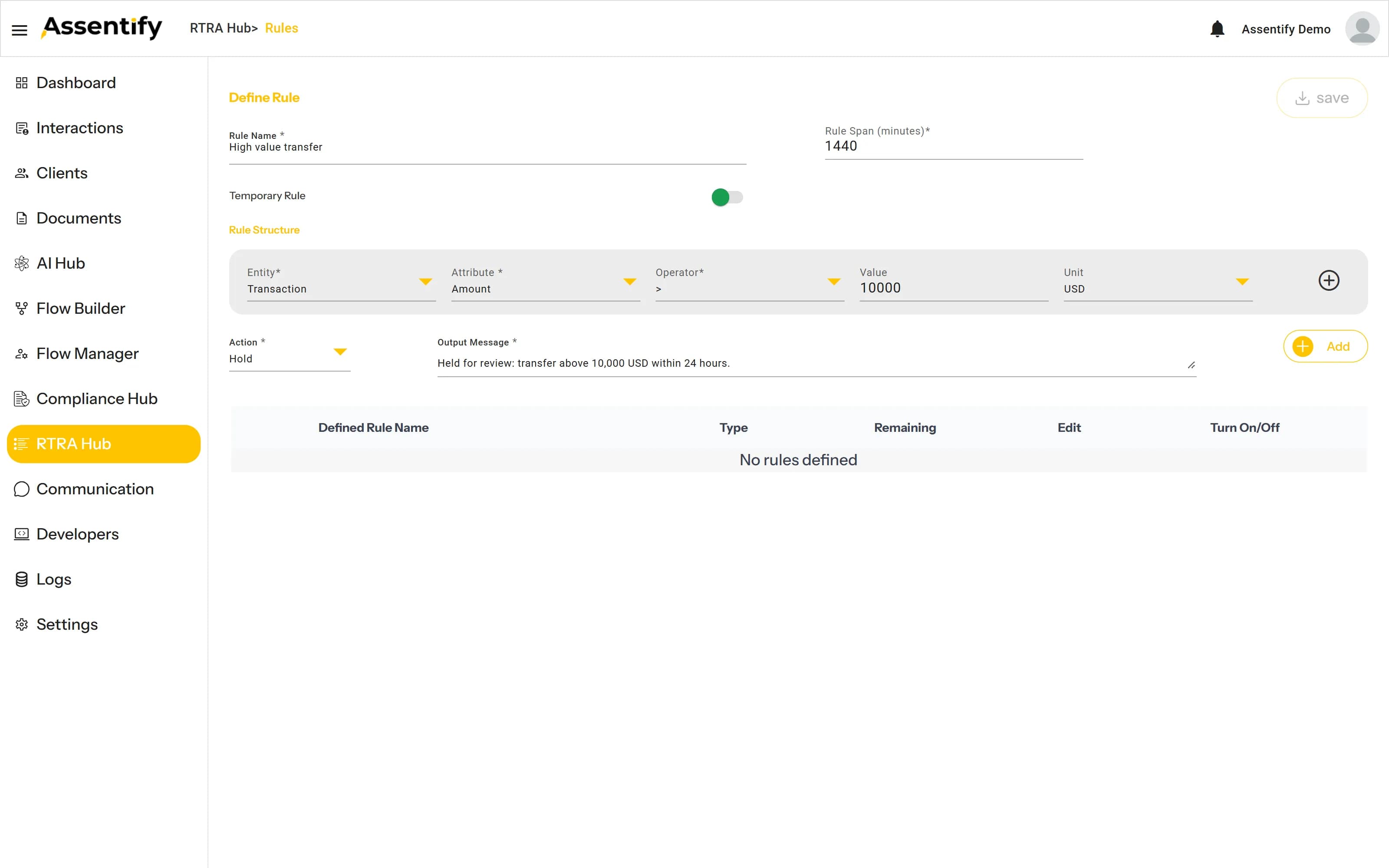
A rule, written in the admin interface.
The risk team writes its own controls and sets the engine itself, so a new typology is answered with a rule the same day rather than a project.
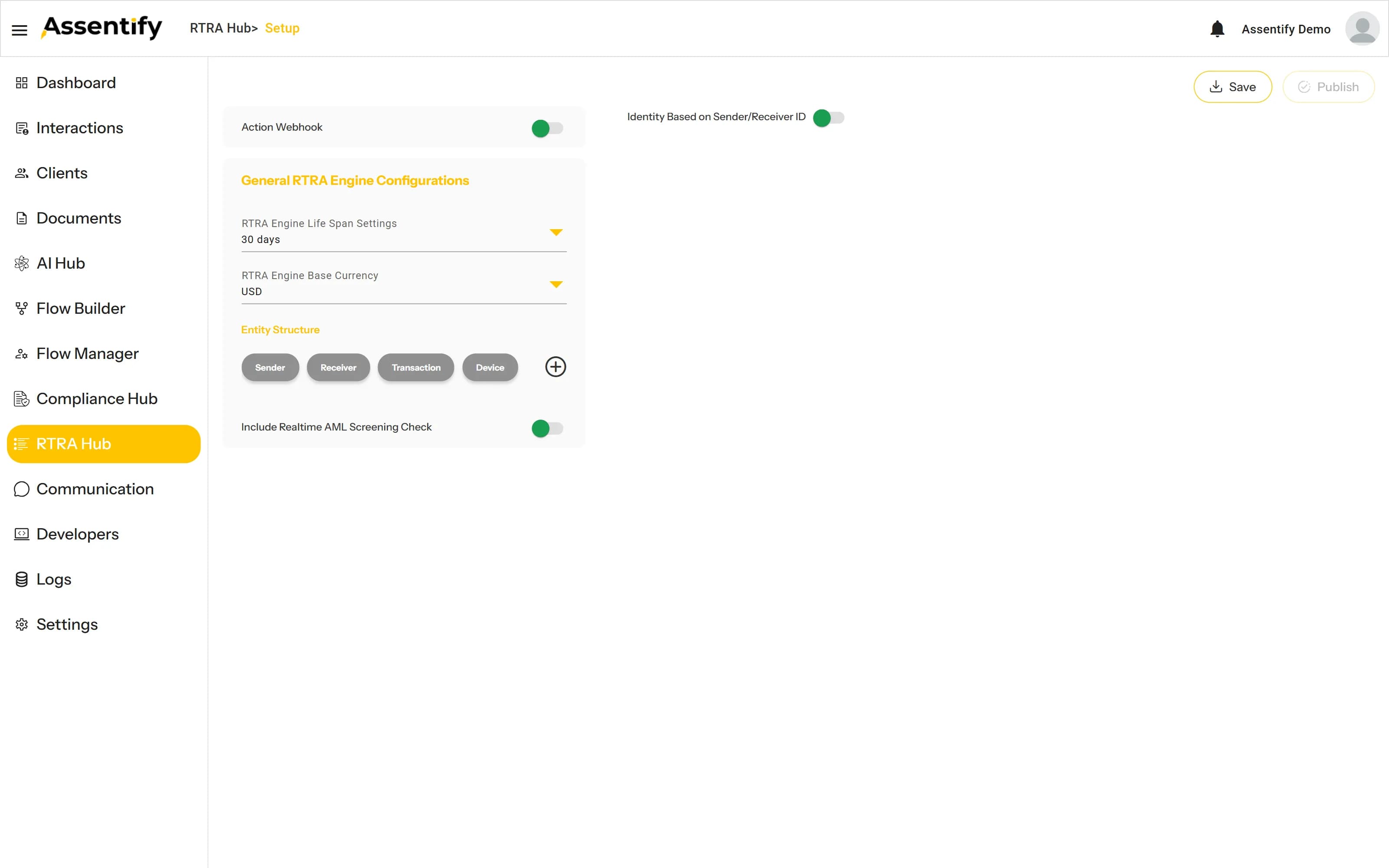
RTRA Setup holds the engine: its life span, its base currency, the entities a transaction carries and the real-time AML check.
Why it exists
A clean onboarding says little about month seven.
Mule accounts, layered transfers and abused wallets often belong to clients who passed verification, because at onboarding there was nothing to find. The risk arrives later, in the behaviour.
Behaviour, after identity
Screening answers who somebody is. RTRA answers whether what they are doing still matches who you approved. Those are different questions and they need different engines.
While it is still moving
A monitoring report that lands the next morning describes money that has already gone. RTRA evaluates in real time, so the action you configured can fire before settlement.
Transaction structure
Three entities out of the box. Add your own.
The engine watches Sender, Receiver and Transaction from the day it is switched on. If your business needs another entity type, you add it, and every rule you write can then reason over it.
Sender
Who the money is coming from. Attributes on the sender are yours to define, so a rule can look at anything your systems already know about the originating party.
Receiver
Who the money is going to. Rules on the receiver are how you catch the patterns that only appear on the destination side, such as a single beneficiary collecting from many unrelated senders.
Transaction
The movement itself. Amount, timing, channel, and whatever else your transaction structure carries, evaluated against the base currency the engine is configured with.
Extensibility is the point. A money transfer business, a wallet, a bank and a gold trader do not watch the same objects, and a fixed schema forces three of them to describe their risk in somebody else’s vocabulary. Here the structure is yours, and the rule builder reads whatever you put in it.
The rule builder
Nine fields. That is the entire rule language.
A rule in RTRA is written in the admin interface, with no scripting language. Step through the sample rule from the Define Rule screen, one field at a time.
Define Rule
9 of 9 fields
Step through it
The rule reads as a sentence.
When a Transaction’s Amount is greater than 10000 USD within the span, Hold it and say why. It lands in Defined Rules with its status, type and remaining days.
The shape of a condition
Entity → Attribute → Operator → Value
Conditions stack with a plus, so one rule can hold several of them. A pattern usually needs two or three facts to be true at once before it is worth anyone’s attention.
Defined Rules
- Status
- Active or inactive, at a glance
- Defined Rule Name
- As you named it
- Type
- Standing or temporary
- Remaining
- Days left on a temporary rule
Every rule you have written, in one table, with edit and delete beside it. Asked what exactly you monitor for, a compliance officer points at a screen.
The claim
Real time means before the money leaves.
Include Realtime AML Screening Check is a toggle on the engine. With it on, screening runs as part of the same evaluation as your rules, so a party that appears on a list is caught at the moment of the transaction. The action and the output message you configured go out immediately.

Screening in the moment
AML checks performed in real time, on the same client record.
RTRA carries its own section for AML screening checks performed in real time, and it reads the client the rest of the platform already knows.
One risk picture
The client whose transaction fires a rule is the same client record created by the onboarding flow, screened by the Compliance Hub, and scored by the risk based approach you configured. A transaction alert therefore arrives with context: risk level, RBA Score, last screening result, and the decision history behind the account. It works the other way too: dynamic RBA lets the client define rules so that transactions evaluated in the RTRA Hub move the RBA Score.
Auditable by construction
Rules are named, spans are visible, temporary rules show their remaining days, and actions carry the message that was sent. A reviewer can see why every decision was taken, which is the standard an examiner applies to automated monitoring.
Compliance actions land in the Audit Hub and platform actions in Logs, both exportable.
Pricing
Starts at $859/month
Published so you can size a budget before you speak to anyone. The RTRA Hub is sold in three tiers on an annual commitment. Transaction volume, entity structure and real-time screening shape the final number, so contact sales to complete.
Tiers
- Starter
- The engine, the three entities and the rule builder.
- Business
- Higher transaction volume and more rule complexity.
- Enterprise
- Contracted volume, support and deployment options.
Most clients pair the RTRA Hub with the Compliance Hub, from $449/month.
Questions
RTRA Hub, answered.
RTRA is Assentify’s Real-Time Transaction Risk Assessment engine, which watches client transactions after onboarding is finished. It is part of the compliance engine alongside AML screening, and it is configured under Settings, in RTRA Engine Configuration. The engine evaluates transactions against rules you write over three entities out of the box, Sender, Receiver and Transaction, and it can perform AML screening checks in real time as part of the same evaluation.
A rule has a name, a span in days, an optional temporary flag, one or more conditions, an action and an output message. Each condition is built from an entity, an attribute on that entity, an operator and a value, and conditions stack so a rule can describe a pattern as well as a single threshold. When the rule fires, the engine takes the action you configured and attaches the output message, so whoever receives the alert knows which rule fired and why.
The Compliance Hub screens people and businesses; RTRA watches what they do. Screening asks whether this client appears on a sanctions, PEP or watchlist, at onboarding and then continuously afterwards. RTRA asks whether this transaction, in this pattern, at this moment, is consistent with the client you approved. Most institutions need both, and in Assentify they sit on the same platform, on the same client record, with one audit trail across both.
RTRA Engine Life Span sets how many days the engine retains the transactional context it reasons over, and the base currency sets the single three-letter currency every amount is normalised to before a rule is evaluated. Both are general configurations set once per tenant. The base currency matters more than it looks: without it, a rule about a threshold means something different for every currency that arrives, which is exactly how monitoring quietly stops working.
The RTRA Hub starts at $859/month, on an annual commitment, in three tiers: Starter, Business and Enterprise. Transaction volume, rule complexity and whether real-time AML screening is included shape the final figure, so contact sales to complete. The RTRA Hub is subscribed to on its own or alongside the Flows Hub, the Compliance Hub and the AI Hub.
Yes, rules can be temporary: every rule carries a Temporary Rule toggle and a rule span in days, and the Defined Rules table shows the remaining days on each temporary rule. Monitoring changes over time. A promotional period, a live fraud incident, a correspondent bank instruction or a regulatory notice all need a rule that is tight for a while and then goes away, without someone having to remember to remove it later.
Start
Write your three worst rules and watch them fire.
Take a tenant for a month, define your transaction structure, write the rules your team argues about, and see what the engine catches.