Digital signing
A signature that survives the printer.
Sign in the flow, immediately after the identity has been verified by the same platform. Bind the signature cryptographically, bind it visibly to the person who made it, and keep both meaningful when the document ends up on paper.
- Trusted in Adobe Acrobat and Reader
- AATL
- Signing keys in a security module
- HSM
- Certificate authority
- In country
The signing ceremony
The stroke draws. The evidence stays.
Assentify signing produces advanced, qualified-grade digital signatures. Signed PDFs carry Assentify’s Adobe Approved Trust List (AATL) certificate, so Adobe Acrobat and Reader show them as trusted. Signing keys are held in a hardware security module, and Assentify runs a local certificate authority in country.
What the client experiences is the stroke on the signing line. What the institution keeps is everything underneath it: the identity verified in the same session, the hash of the exact bytes signed, the moment, and the consent evidence the flow was set to capture.
The evidence set on a signed document
- Signer identityVerified in the same session
- Signature imageProtected by a pattern
- Digital signatureTenant certificate, public key
- Signing videoOptional, per step
- Voice consentOptional, per step
- Document readReview metrics captured
- Audit entryUser, timestamp, event type
In Flow Builder
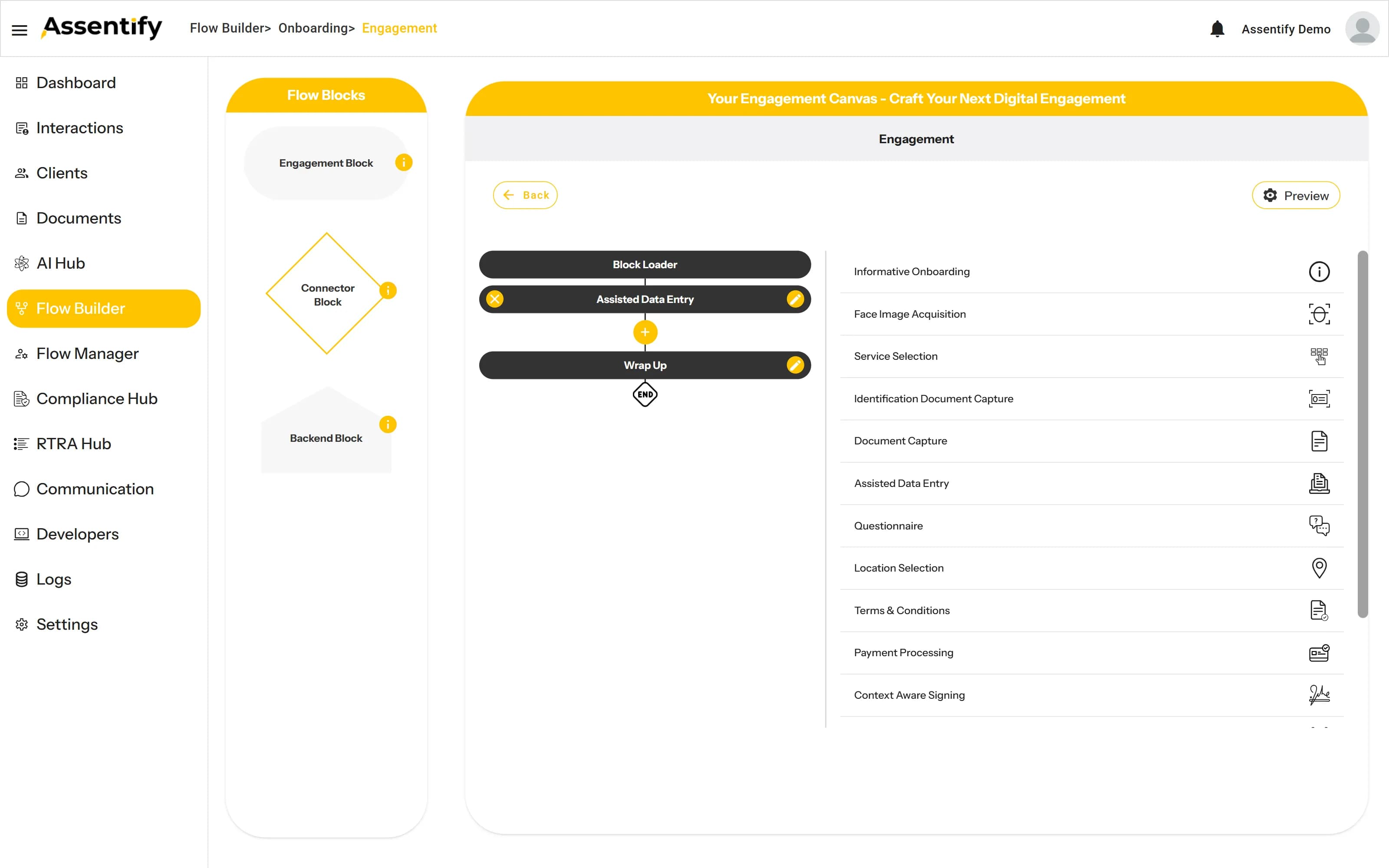
Signing is a step in the flow.
The client signs in the same session that verified them, so there is no second identity check and no gap where the signer could change.
Four layers
Intent, integrity, identity, and paper.
A regulated agreement in this region needs all four, because it will be verified on a screen today and on a desk two years from now.
Electronic signature, in real time
The document is generated during the flow with the client data already in it, presented for review, and signed on the spot. No export, no separate signing portal and no second identity check: the signer was verified minutes earlier in the same session.
Digital signature, cryptographic
The platform signs the document with public key cryptography under the tenant certificate, producing a value anyone holding the public key can verify. Change one byte afterwards and verification fails, so it proves integrity as well as intent.
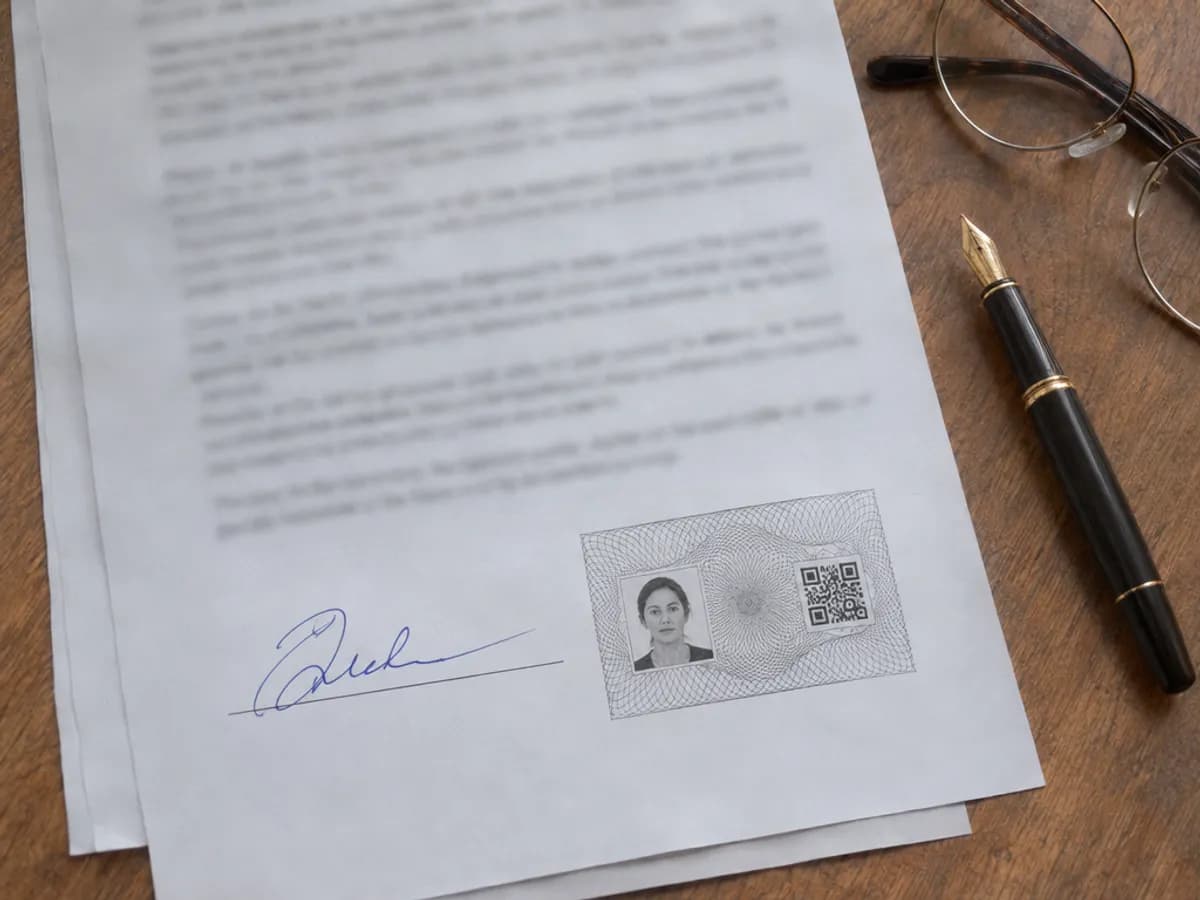
Context-Aware Visible Signature Verifier
The proprietary Assentify layer. It ties the signature image to the signer’s identity and the flow it came from, and shows the two together. A pattern protects the image, so a mark copied out of the document loses its assurance.
Verifiable after printing
Paper carries no signature block, no certificate chain and no hash. The visible verifier is designed for the printed page, where documents in this region are filed, notarised and challenged.
The proprietary part
Every cryptographic protection dies at the printer. Ours does not.
Institutions in this region still print, file and hand documents across counters. A signature that can only be verified inside a PDF viewer leaves a gap precisely where the document is most likely to be questioned. The Context-Aware Visible Signature Verifier keeps the signature bound to the identity and the context on the printed page.
Context aware signing
Evidence about the act of signing.
A dispute rarely turns on whether a PDF was altered. It turns on whether the person understood what they signed, and whether it was really them.
Video on signature
Records video during the signing act, so the evidence shows a specific person applying the signature at a specific moment.
Voice consent
Captures the client’s voice giving consent, which can also be used for voice biometrics. A spoken consent is far harder to repudiate than a typed one.
Document review metrics
Records that the document was actually opened and read before it was signed. The most common challenge to an electronic agreement is that the client never saw the terms, and this answers it directly.
Digital signature and visual verifier
Two independent toggles on the same step: sign the document digitally, and turn on the visual verifier.
Document Template Processing Engine
Your contract, in Word, wired to the flow.
The signing step is only useful if the document it presents is the real one, fully populated, with nothing left for an operator to paste in afterwards.
Legal teams write in Word, so Assentify starts there. Text, date, image and signature tokens bind the contract to the data the flow already holds, so every document is generated complete at the moment the client is ready to sign.
Saved templates appear as a library under Documents, ready for any flow. Changing the wording of a clause is a document edit, with no development ticket.
Integration
In a flow, or from your own systems.
Signing is a step on the canvas for anything you build in Assentify, and a server-to-server surface for anything you have already built elsewhere.
As a flow step
Context Aware Signing sits on the canvas beside document capture, face capture, questionnaires and payment steps. The document is generated from the same data the flow already holds.
As an API
A signature integration API serves systems that generate their own documents and need Assentify to handle the signing and the evidence around it.
Where your data lives
Data Persistence is per tenant, on cloud or on premise, and signed documents follow that setting like everything else the platform stores.
Branch Assisted Mode
At the counter, the same capability.
A client signs at the counter on the same signing step, after the same session has verified them.
- The same published flow, with a member of staff holding the device
- Allow Support, set on the flow in Flow Builder
- The same reviewer queue, flags and decision buttons
- One client record and one audit trail across channels

Questions
Digital signing, answered
An electronic signature is the act of signing captured electronically, while a digital signature is a cryptographic operation that binds a specific document to a specific key so that any later change is detectable. Assentify does both: the client signs in real time inside the flow, and the platform can apply a digital signature under the tenant certificate using public key cryptography. The first records intent, the second proves integrity, and a serious agreement usually wants both.
The Context-Aware Visible Signature Verifier is the proprietary Assentify mechanism for tying an electronic signature to the identity of the person who produced it and to the context of the flow it came from, and for showing the signature and that identity together in the same place. It also protects the signature image with a pattern, which means the visible mark cannot simply be lifted out of one document and pasted into another. Its distinguishing property is that it remains meaningful after the document is printed, where cryptographic protections do not.
A printed document can still be verified because the assurance is carried visibly on the page, not only in the file. A printed document loses its certificate chain, its hash and its signature block, so any purely cryptographic scheme stops being checkable the moment the page leaves the printer. The visible verifier presents the signature together with the identity and context that produced it, protected by a pattern, so a person holding the paper can still see what the signature is bound to.
Assentify signing produces advanced, qualified-grade digital signatures. Signed PDFs carry Assentify’s Adobe Approved Trust List (AATL) certificate, so Adobe Acrobat and Reader show them as trusted. Signing keys are held in a hardware security module, and Assentify runs a local certificate authority in country. eIDAS defines a ladder from simple to advanced to qualified, and the level a document needs depends on the document and the market.
The Document Template Processing Engine is the part of the platform that turns a Word document into a live template. You upload a .docx file, right-click to insert flow inputs as tokens, and map each token to a data point from the flow. Four token types are supported: text, date, image and signature, and the signature token requires no mapping because the signing step supplies it. Saved templates live in a library and are consumed by the Context Aware Signing step, so a contract, a mandate or a policy schedule is generated fully populated at the moment the client is ready to sign it.
Lebanon recognises electronic transactions, electronic signature and personal data obligations under Law No. 81 of 2018 on Electronic Transactions and Personal Data, which is the legal anchor Lebanese institutions cite for remote signing. The practical question for a bank is usually evidentiary rather than statutory: what can you show a court about who signed, what they saw and whether the document changed afterwards. The signing evidence set answers that.
Start
Sign your own contract, then print it.
Upload the Word document your legal team already uses, place the tokens, run the flow and sign. Then send the printed page to the person who will have to defend it.