Engagement building
Compose it once. Publish it everywhere.
An engagement is the part of your business a client actually meets. In Assentify it is a set of steps on a canvas, configured rather than coded, and the same definition reaches the web, WhatsApp and your own application.
- Live on the web or WhatsApp
- Minutes
- Inside your own app
- Hours
- Client-facing steps in the library
- 17
Cross-device handoff
Start on a desktop. Finish on a phone.
A client who started on a desktop scans a QR code and finishes on a phone, and the session follows them across. Nothing restarts and nothing is retyped. The interaction record keeps one trail across both devices.
In Flow Builder
The engagement is a set of blocks on a canvas.
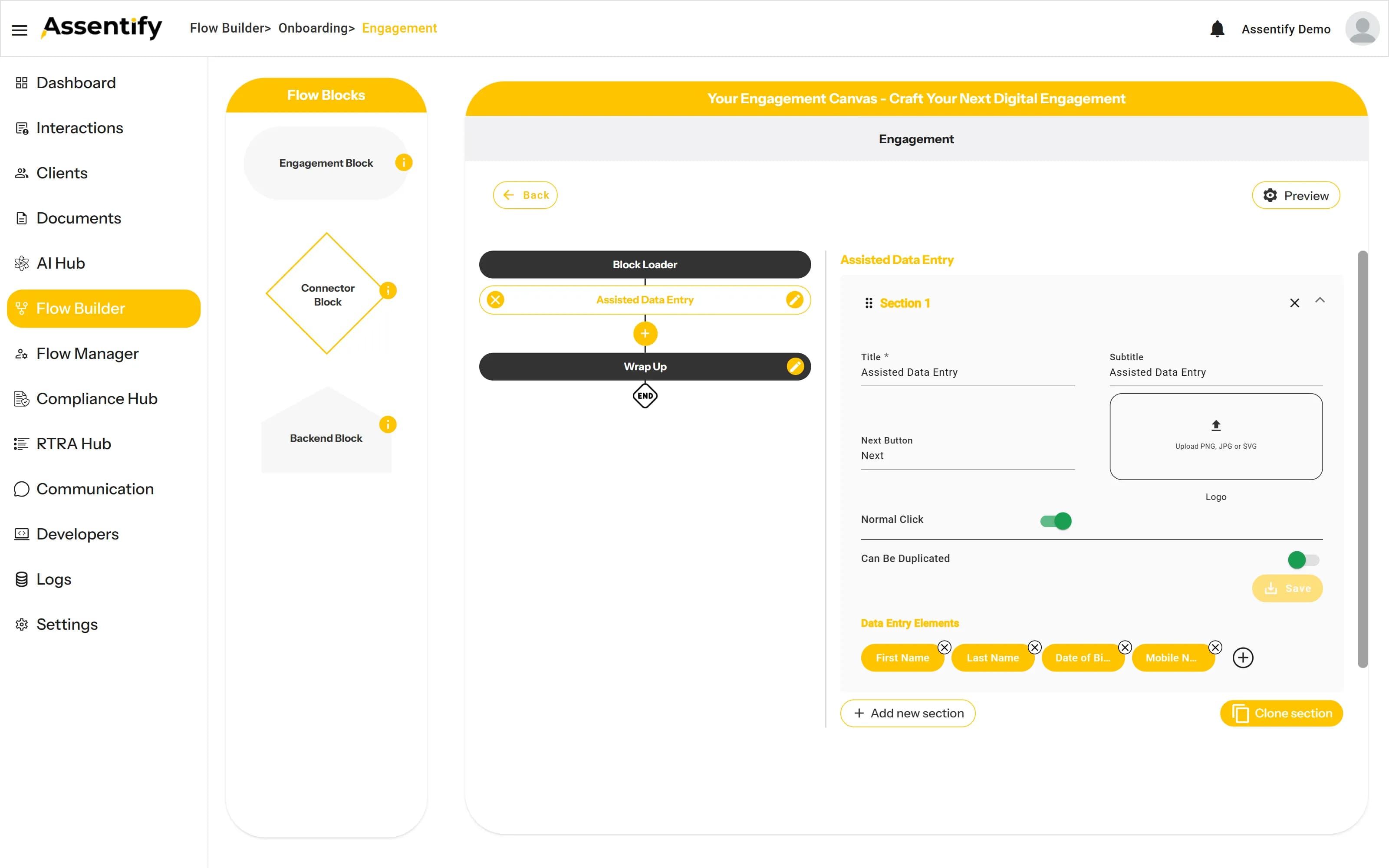
The client-facing part is the Engagement Block. Connector and Backend Blocks carry the messaging, the integrations and the decisions behind it, and every block is configured rather than coded.
Composing
Four decisions make an engagement.
What the client is asked, where the route splits, how it closes, and what it looks like.
The Engagement Block
The oval on the canvas is everything the client sees: an ordered set of steps, each configured through fields and toggles. Identification Document Capture alone carries more than fifteen settings, from skip ability and front only to Document Liveness.
Split, where one flow becomes several
A Split step branches the engagement on a condition, so a corporate applicant takes the Verified Business route while a retail applicant continues on the short one. Nobody maintains two flows that drift apart.
Wrap Up, where it closes
Wrap Up ends the client-facing part, shows the result and hands the case to the Backend Block for screening, decisions and review. The dashboard reports Block Loader and Wrap Up with their own counts and timings.
Theming, so it is yours
Theme Settings carry your primary logo, and each step takes its own title, subtitle, logo and button text. Emails and signed documents carry your brand too, and a white-label SDK add-on removes the Assentify mark.
The step library
Seventeen steps a client can meet.
Connector and backend steps sit behind them for messaging, integration, screening and decisions.
- 01
Block Loader
Opens the engagement and prepares the session.
- 02
Informative Onboarding
Explains what is about to be asked, and why.
- 03
Service Selection
The client picks the product or service they came for.
- 04
Identification Document Capture
The card or passport, with liveness and extraction.
- 05
Facial Image Acquisition
The selfie, matched against the face on the document.
- 06
Document Capture
Any supporting document the case requires.
- 07
Assisted Data Entry
Extracted values shown for confirmation or correction.
- 08
Compliance
Screening and a risk assessment while the engagement runs.
- 09
Questionnaire
Due diligence questions, source of funds, declarations.
- 10
Location Selection
Branch, agent or delivery point.
- 11
Image / Video Capture
Evidence beyond the identity document.
- 12
Terms & Conditions
Consent, captured and timestamped.
- 13
Slot Booking
An appointment, where a human step is required.
- 14
Context Aware Signing
Signature bound to the document and the identity.
- 15
Form of Payment
Payment details, where the service needs them.
- 16
Split
One engagement becomes several routes.
- 17
Wrap Up
Closes the engagement and hands the case to the backend.
- client-facing steps
- 17
- surfaces from one definition
- 4
- canvas, configured not coded
- 1
Allow Support
A toggle on the canvas turns on supported sessions, where a member of staff can assist a client who is stuck. Branch Assisted Mode extends the same idea to the counter, running the same engagement with an employee alongside the client.
Ashley writes the first draft
Describe the interaction you need and Ashley produces a flow, which you then edit on the canvas like any other. It holds context across a multi-step engagement and handles custom settings.
One definition
One engagement. Web, WhatsApp and your own app. Nothing rebuilt.
Most institutions maintain a web onboarding, a separate app onboarding and a manual branch process, and the three disagree within a year. In Assentify the engagement is one definition. Publishing it to a new channel does not fork it, and changing a question changes it everywhere at once.
Publishing
From canvas to client, in the same afternoon.
Flow Manager turns a finished engagement into something a person can open.
Web, in minutes
Publish Flow, then take the Digital Engagement Link, shorten it, generate a QR code, or send it from Flow Manager by email. A branch can be live for a campaign in the time it takes to write the email.
Conversational, in minutes
The same engagement runs inside WhatsApp Flows, a chatbot or SMS, where much of the region already is, without being rebuilt.
Mobile SDK, in hours
Embedded in your own iOS or Android application through the Mobile Flow SDK. A signed reference letter from BOB Finance describes the SDK as easy to integrate, with rapid deployment and minimal technical overhead.
When a new engagement costs a quarter to expose, nobody tests a shorter questionnaire. When it costs an afternoon, the drop rate becomes something a team works on weekly, and the dashboard already reports where clients leave.
Branch Assisted Mode
At the counter, the same capability.
Assisted Data Entry is one of the seventeen client-facing steps, so somebody typing on behalf of a client is a supported interaction with its own step.
- The same published flow, with a member of staff holding the device
- Allow Support, set on the flow in Flow Builder
- The same reviewer queue, flags and decision buttons
- One client record and one audit trail across channels

Questions
Engagement building, answered
You compose it on the Flow Builder canvas from three block types, and the client-facing part is the Engagement Block. Drag the block onto the canvas, add steps from the step library in the order the client should meet them, then configure each step through fields and toggles instead of code. Add a Split step where the route needs to branch, close with Wrap Up, and publish from Flow Manager. Nothing in that sequence requires an engineering release or a vendor ticket.
Seventeen client-facing steps ship out of the box: Block Loader, Informative Onboarding, Service Selection, Identification Document Capture, Facial Image Acquisition, Document Capture, Assisted Data Entry, Compliance, Questionnaire, Location Selection, Image or Video Capture, Terms and Conditions, Slot Booking, Context Aware Signing, Form of Payment, Split and Wrap Up. Connector and backend steps sit alongside them for webhooks, SMS, email, WhatsApp, chatbot, status changes, client updates, screening, pre-processing, post-processing and decisions.
Yes, the same engagement runs on web, WhatsApp and mobile, and that is the point of composing it once. The engagement definition is a single object, and each channel is a way of exposing it rather than a separate build. A web flow or a conversational flow is live in minutes through a published link, a short URL, a QR code or WhatsApp. Embedding the same engagement in your own application through the Mobile Flow SDK takes hours rather than weeks, because there is no second flow to write and no second flow to keep in step.
Yes, an engagement branches for different client types using the Split step. One engagement can send a corporate applicant down a Verified Business route while a retail applicant continues on a shorter path, and both branches remain part of the same definition with the same audit trail. The usual alternative is duplicating the whole flow, and duplicated flows drift until two clients in the same product have different evidence on file.
Every client-facing surface can carry your brand. Theme Settings hold the primary logo, and each individual step takes its own title, subtitle, logo upload and next button text. Emails are composed in the Email Builder and documents in the Template Builder, so what a client receives and what they sign both look like they came from you. Institutions that want no Assentify mark anywhere can take the white-label SDK as an add-on.
In most deployments a business or compliance team owns the engagement and a developer is only involved at the integration boundary. Steps are configured through fields and toggles, the canvas shows the whole route at a glance, and Ashley can produce a first draft of a flow from a description of the interaction you need. Developers still matter for the Data Sources engine, the SDK and webhooks, which is exactly where their time is worth spending.
Start
Build your own onboarding, this week.
We provision a real tenant. Your team composes the engagement, publishes it, and sends the link to a colleague.