Flows Hub
Draw the flow. Or let Ashley write it.
The Flows Hub is the core of the platform. A canvas, three block types, a full step library, an Email Builder, a document Template Builder, and an AI that can produce the first draft for you.
- Live on web and chat
- Minutes
- Inside your own app
- Hours
- Block types
- 3
- Engagement steps
- 17
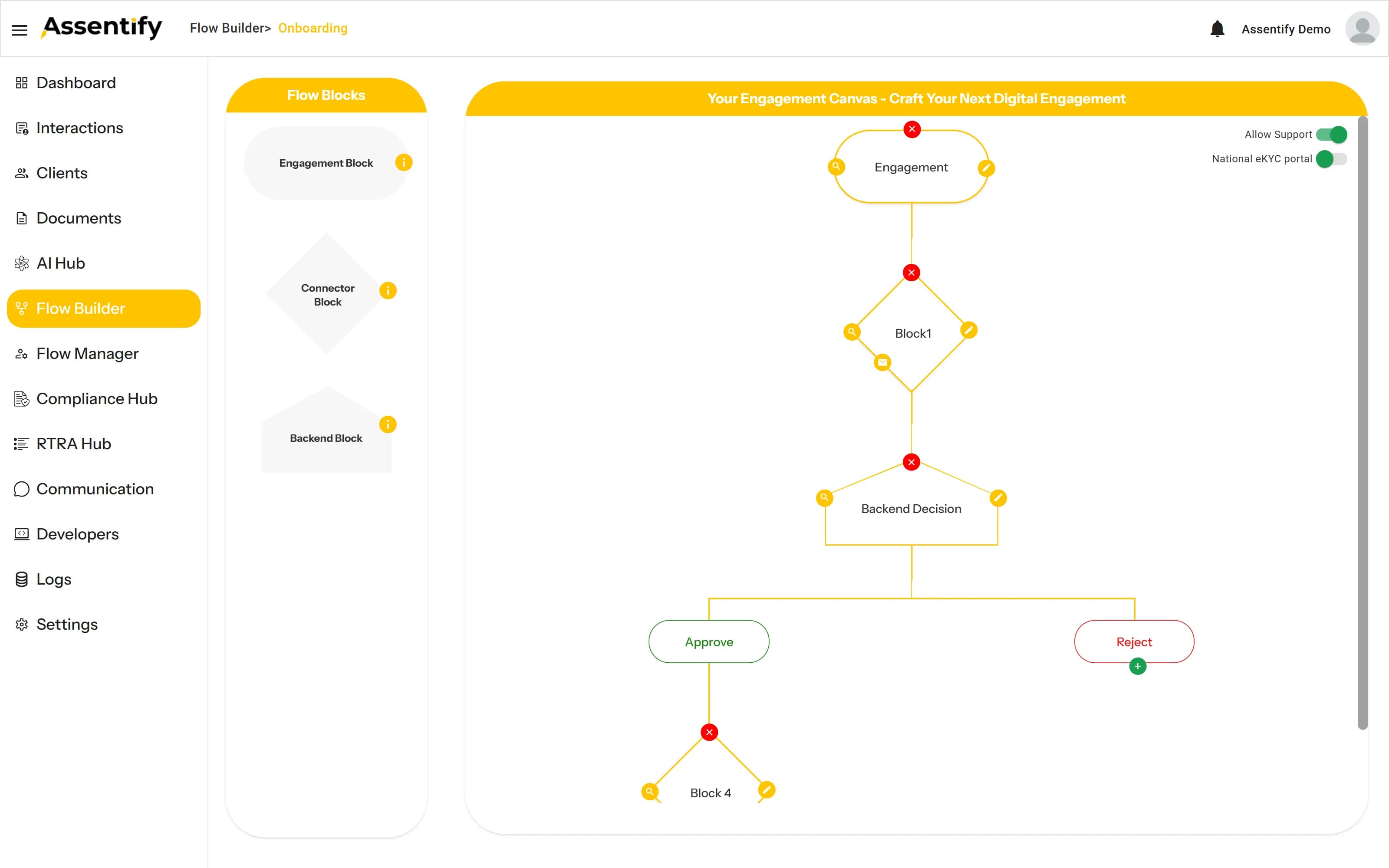
Flow Builder
Your Engagement Canvas, and everything on it is configurable.
Drag blocks onto the canvas, connect them, and open any block to configure it.
Engagement Block
Rounded square on the canvas
Holds the steps a client moves through. Block Loader, document capture, face acquisition, data entry, signing, wrap up.
Connector Block
Diamond on the canvas
Sends something out of the platform. Email, SMS, WhatsApp, chatbot, webhook, status change, client update.
Backend Block
Pentagon on the canvas
Decides. Screening, pre-processing, post-processing, automated decisions and the review queue your team works in.
The step library
Seventeen engagement steps. Seven connector steps. One backend step.
Every step a Flows Hub subscriber can place today, each configured through the admin interface. The seventeen engagement steps belong to the Engagement Block; the connector steps and the backend step belong to their own blocks.
Opens the flow, loads the tenant theme and prepares the session.
Explains what the client is about to do, before you ask for anything.
The client picks the product or service, and the flow branches accordingly.
Card capture with liveness on the document, extraction and country and type control.
Selfie capture with liveness, matched against the face on the document.
Any supporting document: proof of address, payslip, commercial register extract.
Extracted fields shown back for confirmation. A change here marks the record Modified.
Screens the client and assesses the risk while the engagement is still running, so the flow can decide on the fly.
Structured questions, including the ones your regulator requires you to ask.
Branch, pickup point or service area chosen on a map or a list.
Free-form evidence capture where a photo or a short video is the record.
Consent captured as part of the flow, timestamped in the same record.
The client reserves a time, and the booking travels with the interaction.
Signature bound to a document template that has been filled with this flow’s data.
Payment details collected inside the flow through the configured gateway.
One flow, several routes. Retail one way, corporate another, on the same definition.
Closes the interaction, shows the result and hands the case to the Backend Block.
Connector steps
A Connector Block is the flow reaching outward, and the part your operations team changes most often. On the canvas it carries its own email control.
Web Hook
Pushes the interaction payload to your endpoint.
SMS
Sends a message to the client mid-flow or after it.
Sends a template built in the Email Builder.
Continues the interaction inside WhatsApp.
Chatbot
Hands the client to a conversational session, tracked in Communication.
Interaction Status Change
Moves the case to another state.
Client Update
Writes back to the client record in Clients.
Backend Block · one step today
Pentagon on the canvas
Application Processing Step
The Backend Block holds one step today. It appears as Application Command and renders the Application Processing Command Center, where everything the flow collected lands on one record and where your operators work each case: screening, automated decisions, what a reviewer must supply, and the buttons they press.
Every setting on the step, in Flow BuilderBuilders
The email your client reads. The document your client signs.
Two builders sit beside the Flow Builder: one for the message that arrives after a step, one for the document that carries a signature.
Email Builder
Build the templates a Connector Block sends, then attach one to the point in the flow where it belongs. An approval message, a request for a missing document, a reminder to finish an abandoned application. Because the template is attached to a block on the canvas, the person who owns the client experience can change the words without a release.
Sending is configured once in Settings, under Email Setup: SMTP mail server, user name, port, password, SSL required, sender email and authentication required. Mail leaves from your own domain.
Template Builder
The Document Template Processing Engine takes a Word document you already use, and turns it into a live template. You place flow inputs into it as tokens of four kinds: text, date, image and signature. At run time the Context Aware Signing step fills the template with what the flow captured, then presents it for signature. Saved templates become a library the next flow can reuse.

Signing itself comes in three strengths, chosen per flow: real-time electronic signature, authenticated signature, and digital signature with public key cryptography. Whichever you choose, the Context Aware Signing step signs a document the flow itself filled. The signature, the data and the audit trail belong to one interaction.
Assentify signing produces advanced, qualified-grade digital signatures. Signed PDFs carry Assentify’s Adobe Approved Trust List (AATL) certificate, so Adobe Acrobat and Reader show them as trusted. Signing keys are held in a hardware security module, and Assentify runs a local certificate authority in country.
Ashley
Describe the interaction. Get a flow you can edit.
Ashley is the AI inside the Flows Hub. It reads a description of the client interaction you need and produces the blocks, the steps and the settings that deliver it. The output is an ordinary flow on the ordinary canvas, so your team keeps the pen.
What Ashley does
- Generates a complete flow from a description of the interaction you need
- Handles diverse variables and custom settings without losing accuracy
- Keeps context across a multi-step flow rather than treating each step alone
- Adapts to a small team or a national scale operation
- Shapes the output around your business rules and your regulator
Flow Manager
Publish, and it is live.
Flow Manager lists every flow the tenant owns. Select one and the panel gives you what you need on the day you go live.
Edit Engagement
Jump straight back into the Flow Builder for that flow.
Publish Flow
One action moves the flow from draft to live.
Digital Engagement QR Code
A scannable code for branch, print, or a desktop-to-mobile handoff.
Share Links
Send the engagement link to a client by email from the platform.
Pricing
Starts at $1,450/month
Published so you can size a budget before you speak to anyone. The Flows Hub is sold in three tiers on an annual commitment, billed monthly. Seats, active flow counts and add-ons move the final number, so contact sales to complete.
Tiers
- Starter
- One team, one or two live flows, the full builder.
- Business
- More seats, more active flows, more channels.
- Enterprise
- Volume, deployment options and contracted support.
Common add-ons: extra user seats, extra active flows, white-label SDK, quick support, local deployment support.
Questions
Flows Hub, answered.
The Flows Hub is the core of the Assentify Digital Experience Platform, holding the Flow Builder, the Email Builder, the step library, the Template Builder and Ashley. It is where a regulated business designs a client interaction on a drag and drop canvas, configures every step through fields and toggles instead of code, and publishes the result to the web, to WhatsApp or into its own mobile app. It also holds Flow Manager, which turns a finished flow into a link, a short URL and a QR code.
No, a flow is assembled from three block types and configured entirely through the admin interface, without engineering work. An operations or compliance lead drags an Engagement Block onto the canvas, adds steps such as Identification Document Capture and Facial Image Acquisition, sets the toggles for each one, connects a Backend Block for screening and decisions, and presses Publish Flow. Developers are needed only when you embed the flow in your own application through the Mobile Flow SDK.
Ashley is the AI inside the Flows Hub that writes a flow for you from a description of the interaction you need. It generates the blocks and the steps, keeps context across a multi-step flow, handles custom settings and variables, and shapes the result around your business rules. What Ashley produces is an ordinary flow on the same canvas, so your team can inspect it, edit any step and publish it in the normal way.
The Application Processing Step is the one step the Backend Block holds today, and it is where all the data collected across the flow lands. On the canvas the Backend Block is a pentagon, and the step inside it is Application Command, which renders the Application Processing Command Center. The captured document, the captured face, the match percentage, the extracted values, the screening result with every list marked pass or match, the device and the timings all arrive on one record. It is also where a client’s own operators process interactions and create the internal flow around a case, because Automated Processing, Automated Decisions, Pre-Processing, Decisions and the Configure Interactions table are all configured on this one step.
You upload a Word document, then place flow inputs into it as tokens for text, date, image and signature. The Context Aware Signing step consumes that template at run time, so the client signs a document already filled with the data captured earlier in the same flow. Saved templates appear as a library, ready for the next flow that needs them.
The Flows Hub starts at $1,450/month, on an annual commitment, and is sold in three tiers: Starter, Business and Enterprise. The published price lets you size a budget before a conversation. Seat counts, active flow counts, channel add-ons such as the white-label SDK, and any professional services are agreed with sales, so contact sales to complete.
Start
Build one flow this week.
We provision a real tenant on your own subdomain with a sandbox allowance. Build a flow, publish it, scan the QR code with your own phone, and see how far it gets.