Flow automation
Automate the clean case. Escalate the rest.
The Backend Block is where a case stops being a form and becomes a decision. Screening, filters, rules, pre-processing, post-processing and the review queue all live there, and every one of them writes to the same audit trail.
- Fields in a decision rule
- Four
- A second person approves changes
- Maker checker
- Written to the audit trail
- Every action
The Backend Block
Four stages, in the same order, every case.
Every case meets the same four stages in the same order, so a clean case clears on its own and a reviewer only sees the cases that need judgement.
- 01
Pre-Processing
Reference numbers, files and selections attached before anyone works the case.
Case prepared - 02
Automated Processing
AML and PEP screening against the configured lists, filtered at the query.
No match - 03
Automated Decisions
A rule reads the result and decides, and the rule is on the audit trail.
Approved by rule - 04
Post-Processing
The outcome reaches the client record, the core system and the client.
Everyone knows
In Flow Builder
The decision is a block on the canvas.
The decision sits on the same canvas as the engagement it follows, so the people who design the flow also own how its cases are decided.
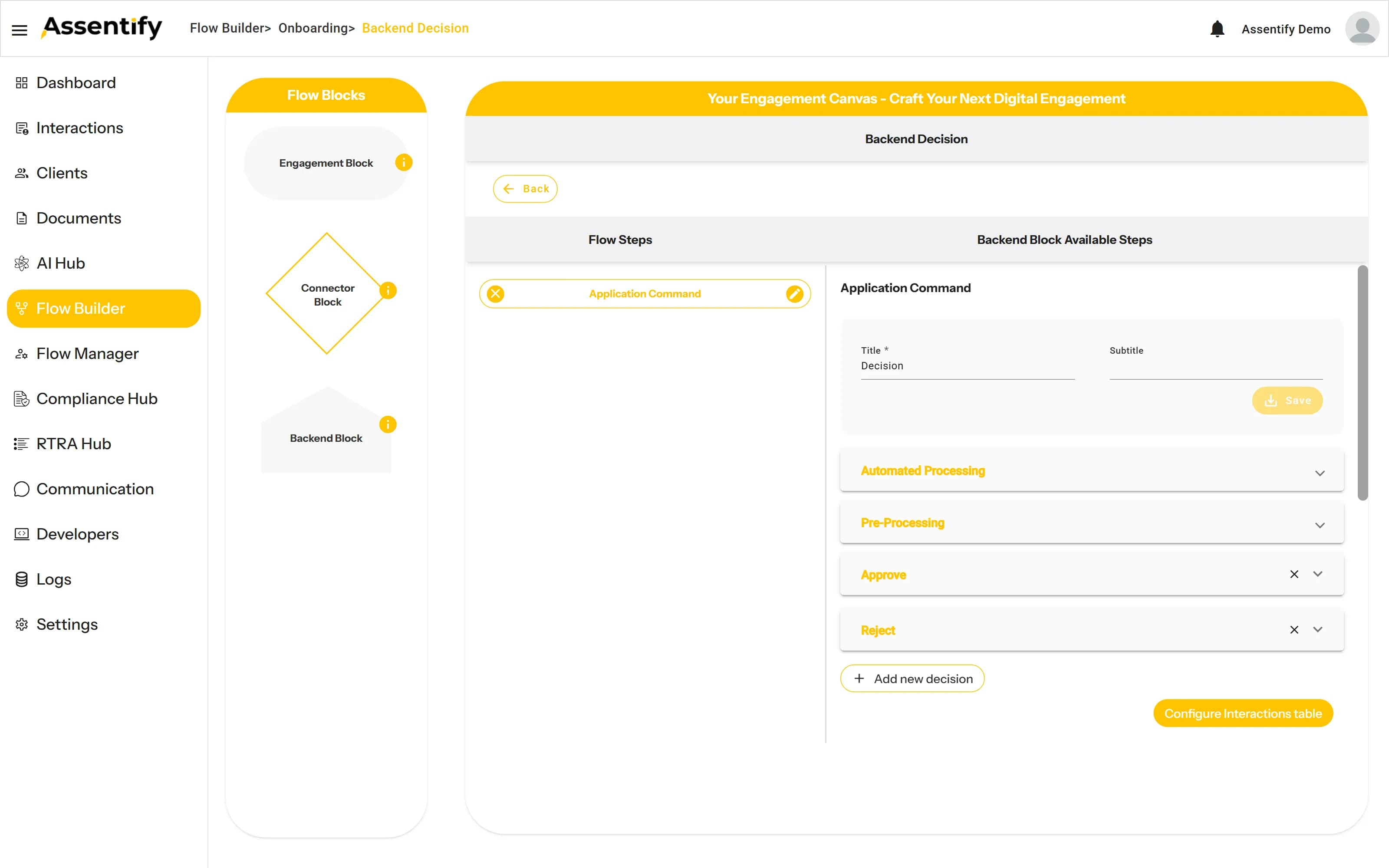
Four stages
Prepare, process, decide, propagate.
A small amount of work done reliably at four points, so the people in the middle only see the cases that need them.
Pre-Processing
Automated Processing
Automated Decisions
Post-Processing
The order matters. Filtering before screening is cheaper than dismissing candidates afterwards. Screening before rules means a rule can read a screening result. Deciding before post-processing means the systems downstream only ever hear about outcomes that actually happened.
Decisions
The buttons on the review screen are yours.
Approve and Decline ship by default. Everything else on that screen is generated from what you configured, so the review queue follows your procedure.
Every case in the queue says why it is waiting before anyone opens it: KYC for a document problem, AML for a possible watchlist match, Modified when an extracted value was edited, a face match came back low or a document check asked for a human.
The decisions a reviewer can take are the ones you defined, stored on the record with the user and the timestamp, and each one can set post-processing in motion.
The operating principle
A false approval is visible. A false decline is silent.
Automate the clean case and escalate the rest. When a rule wrongly approves, somebody finds it, the case is reopened and the rule is fixed. When a rule wrongly declines, a real client closes the app and never tells you why. That is why Assentify recommends straight-through processing for clean cases and a human on everything contested.
Propagation
A decision that stays inside the platform is half a decision.
Connector steps carry the outcome outward: to the client, to your core systems, and to whatever else has to know. They are configured on the canvas like any other step.
Decision
Approved
Carried outward by connector steps
Web Hook
Call an external system and carry the response back.
SMS
Send a message to the client from inside the flow.
Email
Send a template built in the Email Builder.
WhatsApp
Reach the channel most of the region already uses.
Chatbot
Hand the client to a conversational session.
Interaction Status Change
Move the case to a new state.
Client Update
Write back to the client profile.
- destinations: the client, the core, the rest
- 3
- protocols, API and SOAP
- 2
- endpoint kinds: pull, push, file
- 3
The Data Sources engine
Core banking, ERP, CRM and registry connections are registered from the admin interface, over API or SOAP, with pull, push or file endpoints and a test before saving. Your team pushes and pulls data without development or a third party.
Measured, like everything else
Average backend processing time sits on the dashboard beside average engagement processing time, with per-step 95th percentile high and low, so automation can be tuned when volumes change.
Branch Assisted Mode
At the counter, the same capability.
Interactions from a counter land in the same review queue as the web and your app, with the same flags and the same decision buttons from the Backend Block.
- The same published flow, with a member of staff holding the device
- Allow Support, set on the flow in Flow Builder
- The same reviewer queue, flags and decision buttons
- One client record and one audit trail across channels

Questions
Flow automation, answered
Assentify automates the processing around a case in the Backend Block: screening, filtering, rule-based decisions, and everything that has to happen before and after the outcome. Automated Processing runs AML and PEP screening against the lists you select, with filters such as country and date of birth. The Automated Decisions rule builder then applies rules made of a Rule Name, a Condition, a Decision and a Check Value. Pre-processing prepares the case, post-processing pushes the result out to messaging, webhooks and your core systems.
Each rule is four fields: a Rule Name, a Condition, a Decision and a Check Value. The rule is defined inside the Backend Block on the Application Command step, alongside the screening toggles and list selection, and it runs while the case is being processed. Keeping the grammar this small is deliberate, because a rule an examiner can read in one line is a rule an institution can defend. Every rule change is recorded with the user, the timestamp and the event type.
Yes, Approve and Decline ship by default and any number of custom decisions can be added, named for your own process. The decisions you configure are exactly the buttons a reviewer sees on the record in the Application Processing Command Center, so the review screen matches your operating procedure instead of a generic template. Each decision is stored with the case together with the user and the timestamp, and can trigger post-processing.
Dual maker checker control requires a second person to authorise platform-wide changes, so no single account can both propose and apply a configuration change. It is a setting in System Configuration and it applies across the tenant. The same speed that lets a compliance team tighten a rule without a release would otherwise let one person weaken one just as quickly.
Automate the clean cases and escalate everything else, and never auto-decline. A false automatic decline is invisible: a legitimate client is turned away and no case is opened. Assentify supports straight-through processing for clean cases through the Automated Decisions rule builder, and keeps a human on the cases where the evidence is contested.
Through Connector steps and the Data Sources engine. Connector steps send a webhook, an SMS, an email, a WhatsApp message or a chatbot prompt, change interaction status, or write back to the client profile. The Data Sources engine registers core banking systems, ERPs, CRMs and registries from the admin interface, with API or SOAP, API key or basic authentication, pull, push or JSON file endpoints, optional XSLT transformation, and a test button before you save.
Start
Write one rule. Watch the queue change.
Take the case type that consumes most of your reviewers, write the rule that clears it, and see what is left.