Real-time risk
Under two seconds, at load.
Screening completes in under two seconds under production load. Here is what is timed, where it is timed and under what conditions, because a number without a method is not evidence.
- Screening at production load
- Under 2 s
- Entities a rule reads
- Three
- Risk score on every client
- 0 to 10
Assessed as it happens
Every payment judged as it lands, and the risk score follows.
Transactions are assessed and their parties screened while the payment is in flight. When behaviour changes, the client's risk score moves with it, on rules your risk team wrote.
In the RTRA Hub
A rule is written in the admin interface.
Controls are written by the risk team in the RTRA Hub and take effect without a release, so a response to a new typology is a change made the same day.
The RTRA engine
Onboarding is a moment. Behaviour is the rest of the relationship.
Real-Time Transaction Risk Assessment watches what a client does after they are onboarded. It runs in the RTRA Hub and works alongside AML screening.

Three entities, extensible
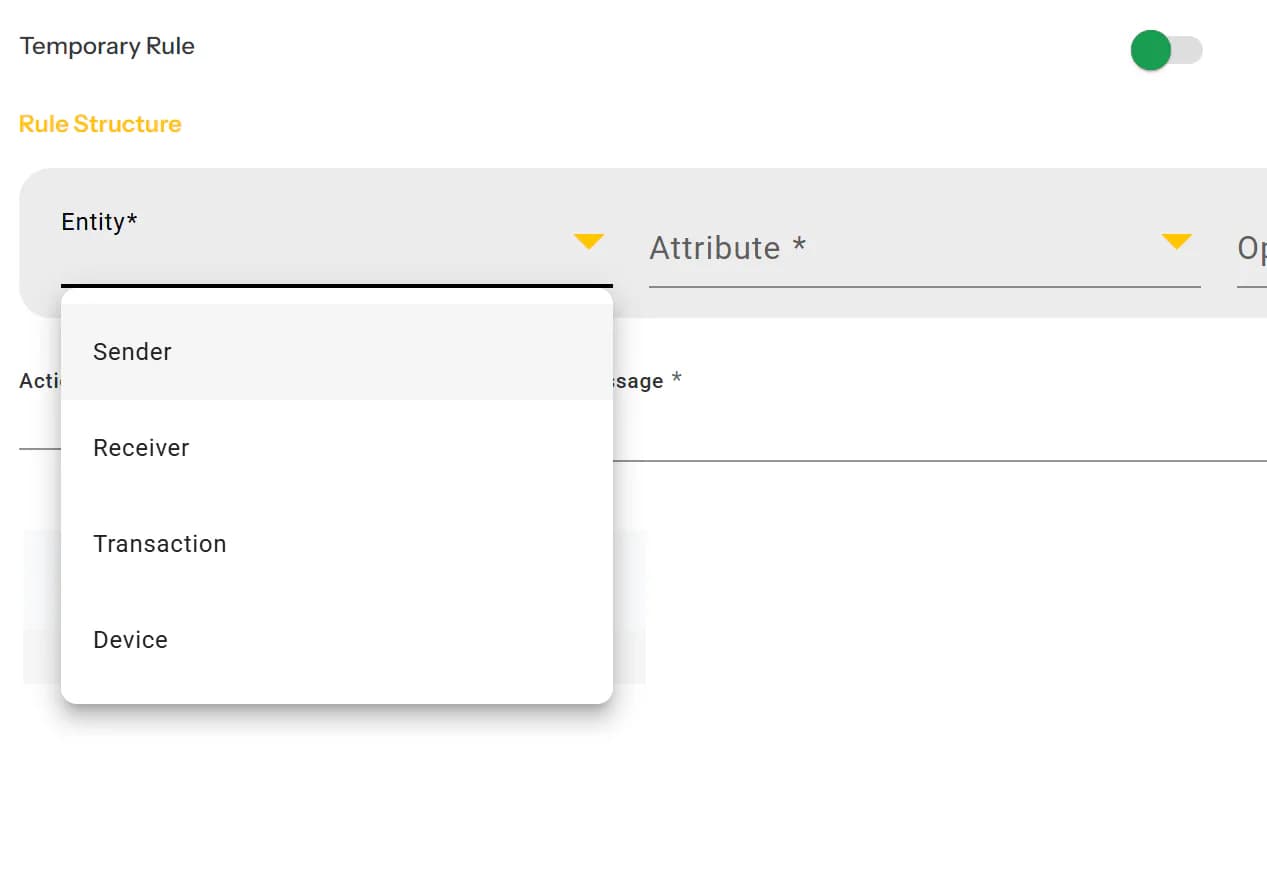
The RTRA engine watches the Sender, the Receiver and the Transaction itself, and a rule can read attributes on any of them. Further entity types are added when a business needs them, so one engine fits a wallet, a remittance house and a lender.
A rule is a structure
Entity, Attribute, Operator and Value conditions, stacked as far as the case needs, then an Action and an Output Message that say what happens when the rule fires and what the operator is told.
AML screening inside the transaction
Include Realtime AML Screening Check turns the Compliance Hub engine on inside transaction assessment, so the parties to a payment are screened while it is assessed, with no overnight batch.
Life span and base currency
A life span in days sets how far back the behavioural window reaches, and a base currency puts amounts on one scale. Together they decide whether a velocity or threshold rule means anything.
Every part of a rule is a field in the interface. The Defined Rules table shows each rule’s status, type and remaining span, so a temporary control has a visible expiry and no change waits for a release window.
How it is measured
Screening completes in under two seconds at load, and you can measure it yourself.
Timed server side, from request received to result returned, on production tenants at normal concurrency, with the full list set and transliteration enabled. The client device, its network and page rendering are excluded, because Assentify does not control them.
Risk based approach
A score is only useful if something depends on it.
Assentify computes the risk based approach score, shows it in the queue, and lets platform behaviour follow it.
An administrator turns the risk based approach on, defines the risk levels, and sets the thresholds on a 0 to 10 strip. Low, Medium and High ship out of the box and more can be added. The resulting RBA Score appears on every row in Client Clear, next to the client status, the date last cleared and the date of the last hit. With Dynamic RBA, rules the client defines let transactions evaluated in the RTRA Hub move the score. Re-screening cadence and expiry alerts sit on the same client profile type.
Between the RTRA engine, continuous re-screening and the RBA Score, an institution has three different clocks running on the same client: what they did just now, what the lists say this week, and how much attention the relationship is owed overall.
Risk, as configured
- Risk based approach
- Turned on per tenant, defined per client profile type
- Risk levels
- Low, Medium and High out of the box, extensible
- Thresholds
- Configured per client on a 0 to 10 strip, for example 3.30 and 6.66
- RBA Score
- Shown on every row in Client Clear
- Dynamic RBA
- Rules the client defines let RTRA Hub transactions move the score
- Automatic escalation
- Confirm and Allow moves the profile to high risk
- Re-screening cadence
- Run AML screening every X days, three by default
- Expiry alerts
- KYC expiry at 30 days, renewal at 1000 days by default
The method behind the under two seconds figure
- What is timed
- Screening request received to screening result returned
- Where it is timed
- Server side, inside the tenant, not in a browser
- Under what load
- Production tenants at their normal concurrency
- With what enabled
- The full configured list set, transliteration on
- What is excluded
- The client device, its network and page rendering
- How you check it
- Average and 95th percentile latency on your dashboard
Reproduce it in a trial tenant with your own lists, volumes and names.
Evidence
Every real-time decision leaves a record.
Real-time decisions are the hardest to reconstruct, because nobody was watching when they happened.
Every action, recorded
Compliance actions land in the Audit Hub with the user, the timestamp and the event type, filterable and exportable. Platform activity lands in Logs on the same terms.
Every decision, consequential
An RTRA rule fires an Action and attaches an Output Message, so the operator sees why. Screening decisions carry their own consequence, from blocking the interaction to escalating the profile.
Every step, measured
Per-step average time, 95th percentile high and low, pass, skip and error counts, reported on the dashboard by default.
The cheapest way to make a control fast is to record less about it. Assentify writes the record as part of the transaction, so the same run produces the decision and the file an examiner will read.
Read next
Questions
Real-time risk, answered
Screening completes in under two seconds at load. That figure is measured server side, from the moment the screening request is received to the moment the result is returned, on production tenants running at their normal concurrency, with the full configured list set and transliteration switched on. It excludes the client device, its network and page rendering, which Assentify does not control. Every tenant can verify the same measurement in its own dashboard, which reports average engagement and backend processing time and 95th percentile step latency by default.
RTRA is Assentify’s Real-Time Transaction Risk Assessment engine, and it watches client transactions after onboarding rather than during it. It models a transaction as three entities, Sender, Receiver and Transaction, and further entity types can be added. Rules are built from Entity, Attribute, Operator and Value conditions with an Action and an Output Message, and each rule carries a span in days and an optional temporary flag. Real-time AML screening can be included inside the assessment, so the parties to a payment are screened while the payment is being judged.
The RBA Score is the risk based approach score Assentify computes for every client, shown on each row in Client Clear so analysts triage by risk rather than by arrival order. An administrator turns the risk based approach on, defines the risk levels, which are Low, Medium and High out of the box and extensible, and sets the thresholds on a 0 to 10 strip. Confirming a screening match and allowing the client anyway moves that profile to high risk automatically. The score is not only static: dynamic RBA lets the client define rules so that transactions evaluated in the RTRA Hub move the RBA Score.
A buyer can reproduce the test from the stated method, then check it again in their own tenant during a trial. Latency claims in this category are usually measured under conditions the vendor never states, often on an idle system, often excluding the screening step that dominates the cost. Assentify states what is timed, where it is timed, under what load and with what enabled, and ships the measurement in the product.
Yes, they answer different questions and both are needed. Screening at onboarding, run inside the Backend Block, establishes who a client is on the day they join. Continuous re-screening, every three days by default, catches a client who appears on a list later. Real-time transaction screening in the RTRA engine catches the counterparty in a payment, which neither of the other two can see. An institution that only screens at onboarding is looking at a photograph of a moving thing.
Yes, RTRA rules are built in Settings under RTRA Engine Configuration, using structured conditions rather than code, and they take effect without a deployment. A rule can be marked temporary and given a span in days, which is how most institutions handle a seasonal control or a response to a specific typology, and the Defined Rules table shows the remaining span so nobody forgets a control that was meant to expire.
Start
Run the timing test in your own tenant.
We provision a real environment, load your lists, and let your team push volume through it. Read the latency off the dashboard rather than off a slide.