Digital Experience Platform
The platform your teams log into every day.
Assentify is a no-code orchestrator for regulated business. Design any client interaction, publish it to web, chat or your own app, screen it, sign it, monitor it, and read one audit trail for all of it.
- subscribers live
- 30+
- transactions a day
- 100K+
- 27001 certified
- ISO
- processing available
- In country
Four hubs
Subscribe to one hub, or to all four.
The platform is sold as four hubs, each in three tiers, on an annual commitment. Pick a hub to see its screen. Prices are published per month so you can size a budget first.
Starting prices per month, on an annual commitment. Each hub comes in three tiers.
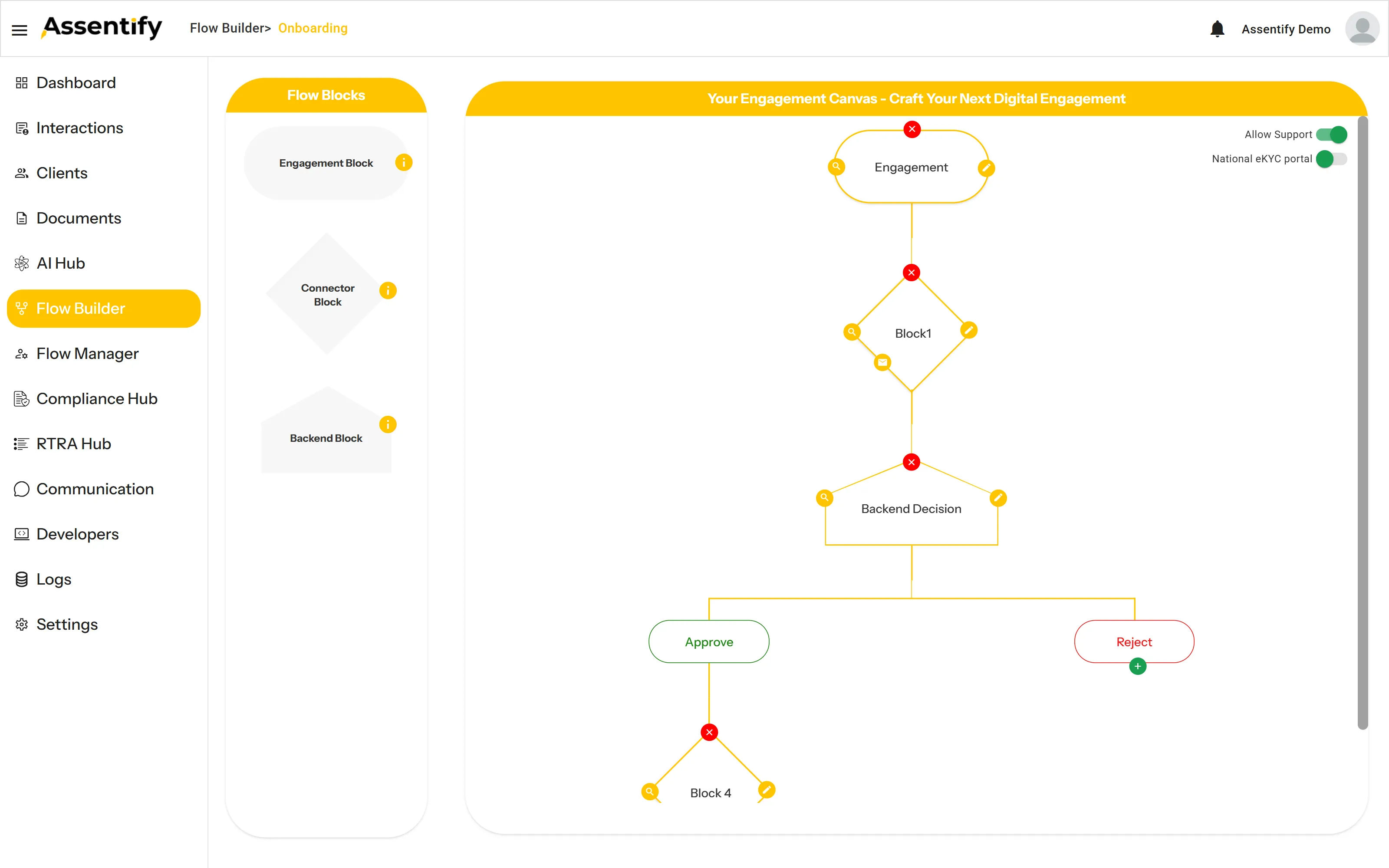
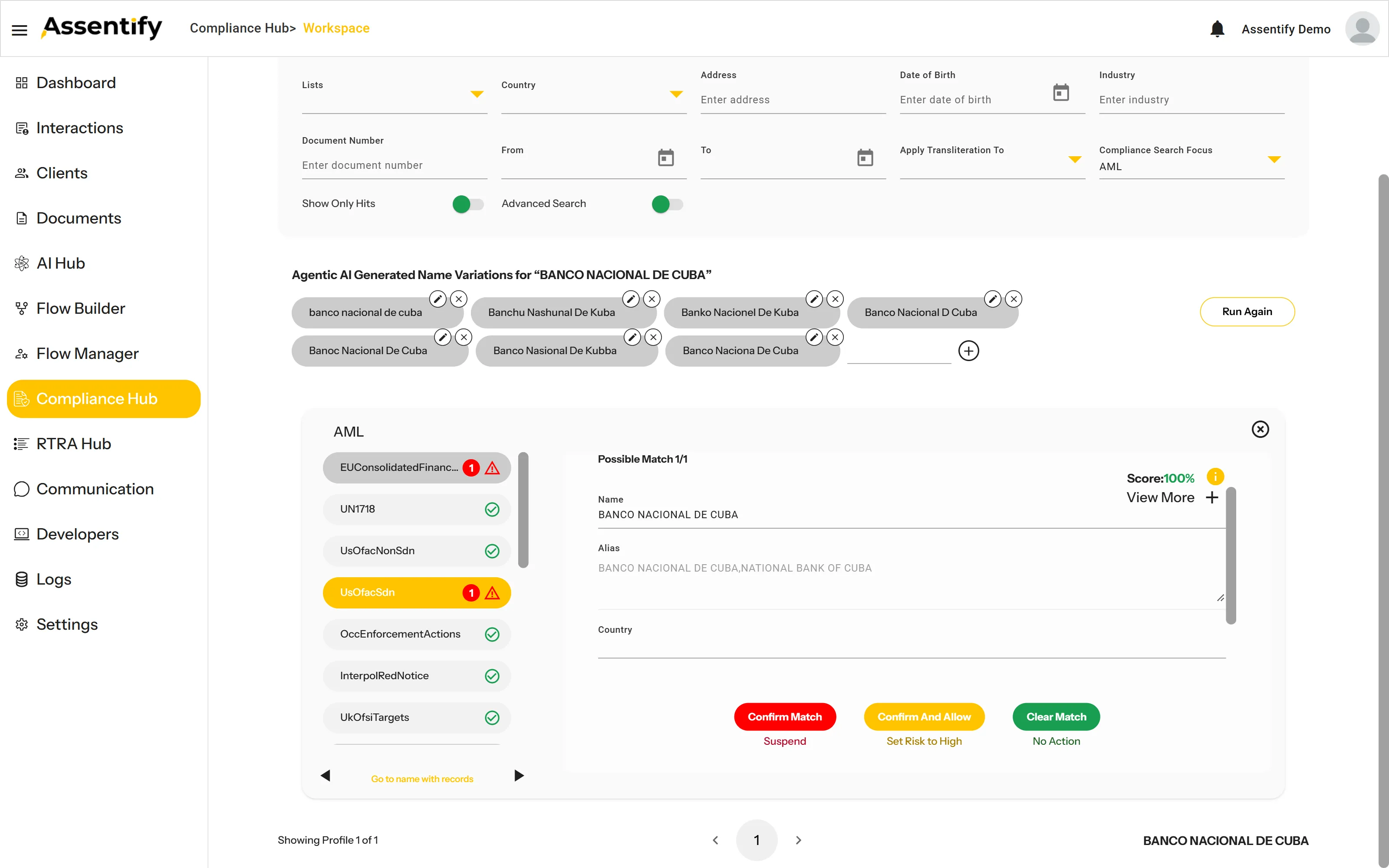
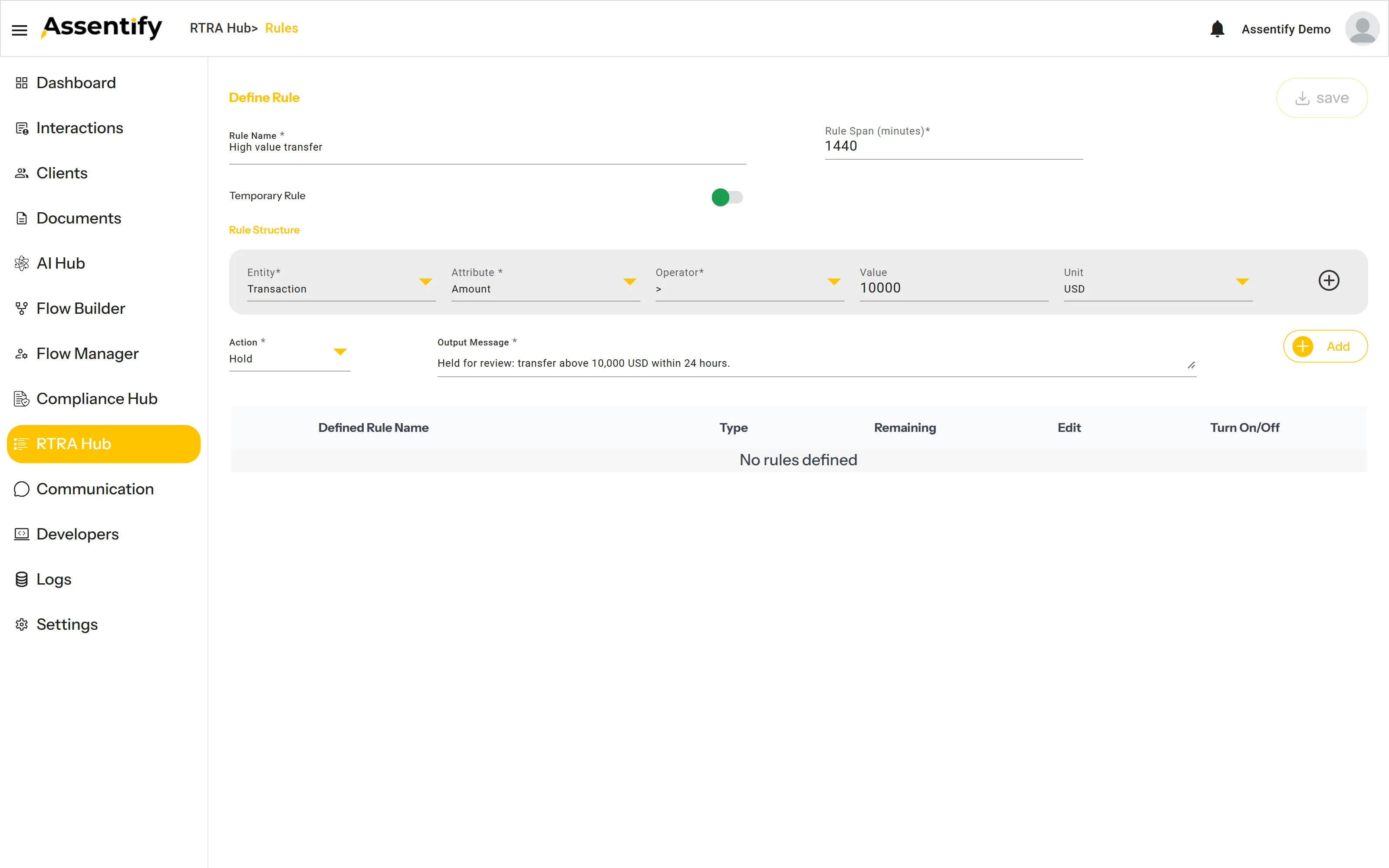
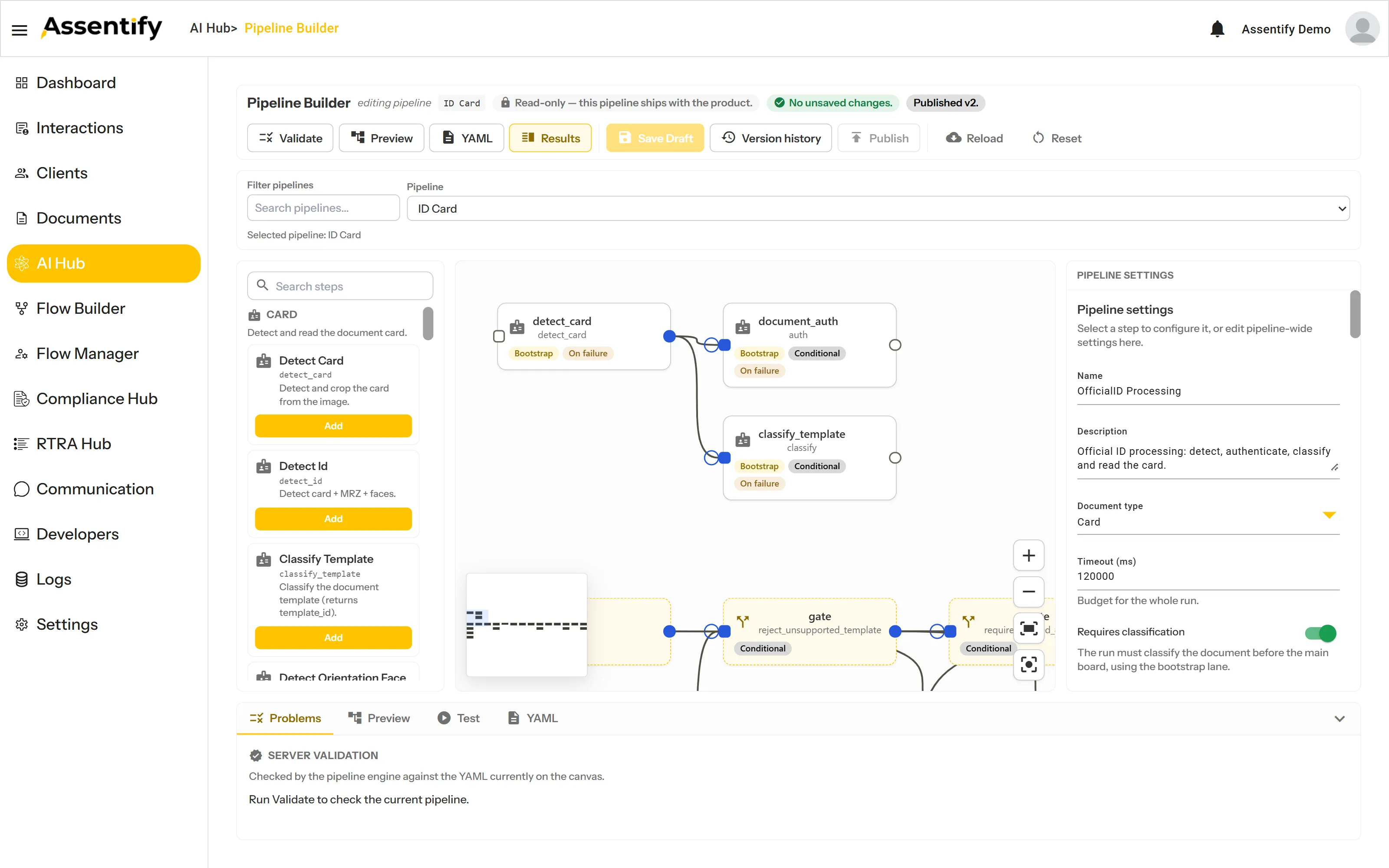
- Flow Blocks
- Engagement block
- Connector block
- Backend decision
Add-ons include local deployment support, extra seats, extra active flows, a white-label SDK, a digital signing certificate and priority API rate limits.
The proposition
Six vendors. Or one platform.
A regulated business usually buys identity verification, AML screening, signing, a workflow engine, transaction risk scoring and document AI from six companies, then pays again to make them talk. Assentify packages all six.
Identity verification
Document capture, templated OCR and MRZ parsing, card liveness, tampering detection, face matching and iBeta certified passive liveness, plus active and configurable liveness.
AML screening
Sanctions, PEP and watchlist screening at onboarding and continuously afterwards, with a clearance workspace, risk scoring and a full audit trail.
Digital signing
Real-time electronic signature, authenticated signature, digital signature with public key cryptography, and a Word template engine that binds signatures to real flow data.
Workflow engine
A drag and drop canvas with three block types, a step library, branching, decisions and publishing to web, chat, mobile and Branch Assisted Mode from the same flow.
Transaction risk
Real-time transaction risk assessment and risk based approach scoring on the same client record. The RBA Score runs 0 to 10, and each client sets its own thresholds to its risk appetite, 3.30 and 6.66 in the documented example, so a decision can be explained after the fact. With Dynamic RBA, rules the client defines let transactions in the RTRA Hub move the score.
Custom AI processing pipelines
The AI Hub: templated OCR, our own fine-tuned vision model, a Pipeline Builder and a Playground. The same pipelines are what our engineers point at a client’s own documents and decisions when the catalogue does not cover them.
How a flow is built
Everything on the canvas is one of three shapes.
A rounded square for what the client sees, a diamond for what leaves the platform, a pentagon for what the platform decides. Learn three shapes and you can read any flow in the business.
Engagement Block
Rounded square on the canvas
What the client sees and does.
Connector Block
Diamond on the canvas
What leaves the platform.
Backend Block
Pentagon on the canvas
What the platform decides.
Inside one Engagement Block, as the builder shows its steps
- 01Block Loader
- 02Identification Document Capture
- 03Face Image Acquisition
- 04Split
- 05Assisted Data Entry
- 06Wrap Up
The amber packet is the client, moving through the block’s steps one after another.
An Engagement Block holds the steps the client sees, in order, from the Block Loader to Wrap Up. A Split step inside it sends a corporate applicant down a Verified Business path while a retail applicant continues on the short route, in the same block and the same audit trail.
How the three blocks work, in Flow BuilderOne interaction, end to end
Capture. Extract. Screen. Decide.
Follow one client interaction through the platform. The capture, the extraction, the screening result and the decision belong to one interaction record, with one trail behind it.
01
Capture
The client opens the flow on a link, a QR code or inside your app. Identification Document Capture reads the document with card liveness, and Facial Image Acquisition takes the live face with iBeta certified passive liveness. On a desktop with a poor camera, the capture hands off to the phone by QR code.
- Document capture
- Card liveness
- Passive liveness
- Mobile handoff
02
Extract
The AI Hub reads what was captured. Templated OCR and MRZ parsing turn the document into fields, each with its own value, and the live face is matched against the face on the document to produce a Match Percentage. Nothing is retyped by anyone.
- Templated OCR
- MRZ parsing
- Face match
- No retyping
03
Screen
The Backend Block runs AML and PEP screening against the lists you chose. The local Lebanese lists, ISF Leb 24 and SIC 18-26, sit beside global coverage through the LexisNexis and Refinitiv plugins. Arabic to Latin transliteration is applied where names cross scripts.
- ISF Leb 24
- SIC 18-26
- LexisNexis plugin
- Refinitiv plugin
04
Decide
The case lands in the Application Processing Command Center with the selfie beside the document, the match percentage, and the screening result inline. Your reviewer presses the Approve or Decline button you configured. An automated rule fires where you wrote one, and every action lands in the audit trail.
- Command Center
- Approve / Decline
- Decision rules
- Audit trail




The modules
One left navigation for every team.
Each item in the platform’s left navigation is a working surface your team uses, from the dashboard to the AI Hub and the RTRA Hub.

Dashboard
The operational figures on one screen. Total interactions, average engagement processing time and average backend processing time, each with a week navigator.
- Engagement Insights by flow, day, week or month
- Success on first, second, third try and after three tries
- Good image, authentication failed, blurred image, unsupported ID
- Per step average time and 95th percentile high and low
- WANDA: describe a widget in a sentence and add it
WANDA, the Widget and Dashboard Assistant
Ask for a widget in a sentence.
Describe the figure you want to see. WANDA turns the sentence into a dashboard widget, previewed as a chart or as its spec, sized to one, two or three columns, and placed on your own tab, the Admin tab or the Everyone tab.
- A sentence, in plain wordsDescribe the widget you want
- Privacy filterNames, IDs and numbers become tokens
- WANDAReceives the list of measures only
- A fixed widget libraryNo generated code runs
- Every request in Logs
- On your dashboardOwn, Admin or Everyone tab
The limits it works under
- Names, IDs and numbers are replaced with tokens before the sentence is sent.
- WANDA receives the list of available measures. It never receives client records, images or documents.
- Widgets are built from a fixed library. No generated code runs in your portal.
- Numbers respect your permissions. Only holders of the shared widgets claim can place a widget on the Admin or Everyone tab.
- Every request is written to Logs.
WANDA is used by consent, which a user can withdraw. The dashboard works without it.
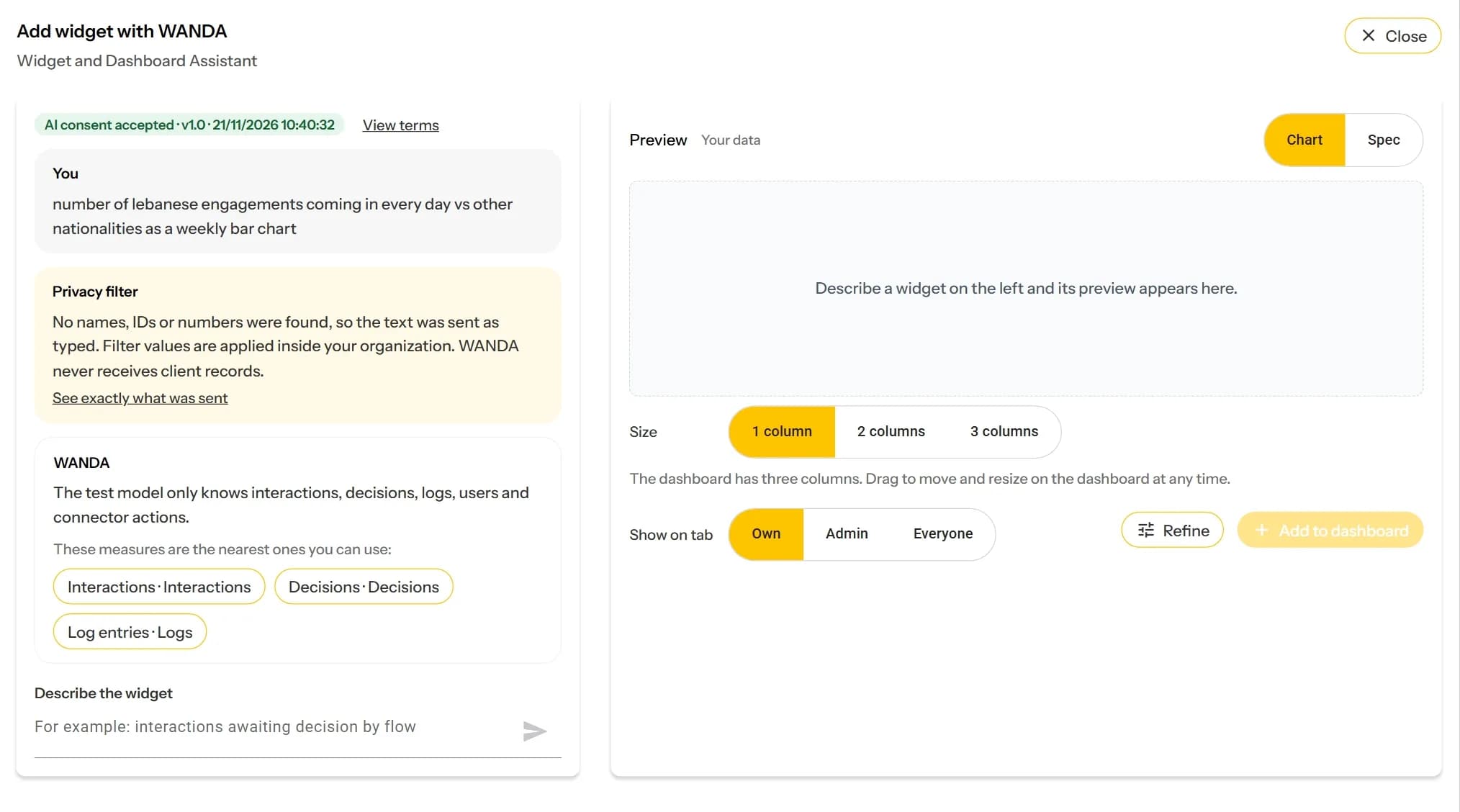
Add widget with WANDA: the request, the privacy filter, the measures it can use, and the preview with its size and tab.
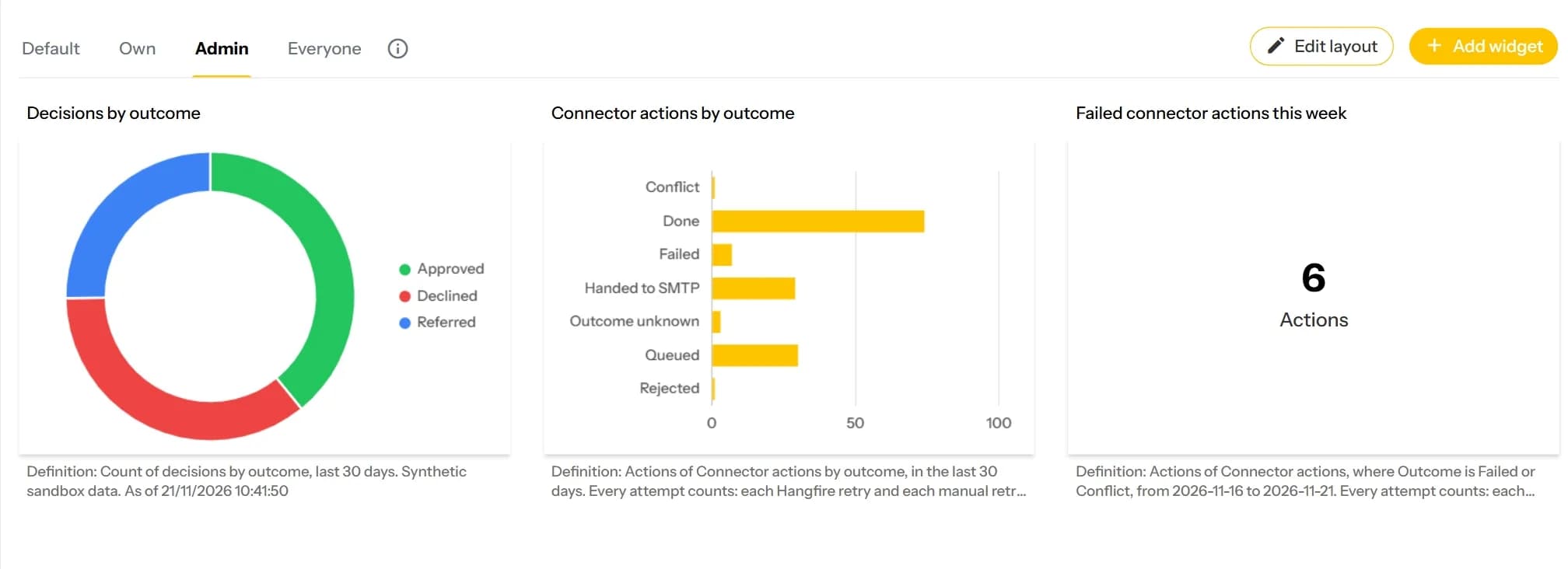
The widgets on the dashboard, each with the definition it was built from.
The claim
One integration. One audit trail. One name on the contract.
When six vendors sit behind one client relationship, six things can break and nobody owns the failure. Assentify holds the capture, the extraction, the screening, the score, the decision, the signature and the record in one place, with one export an auditor can read end to end.
Reach and integration
One flow. Four channels. Your core systems behind it.
The same flow definition reaches a client on the web, inside WhatsApp, embedded in your own application, or at a branch counter with staff alongside. Nothing is rebuilt per channel.
One flow definition, published to every channel.
Data Sources engine
Your core systems, wired in from the admin interface.
Core banking, ERP and CRM systems are added as data sources from the admin interface and tested in place, with no development and no customisation. Any Connector Block in any flow can then call them.
See the Data Sources engineMeasured by default
Average engagement time, average backend time and 95th percentile step latency ship on the dashboard by default. So does first-try capture success.
Drafted by AI, if you want
Ashley writes the flow from a description of the interaction you need, then you edit it on the canvas like any other flow.
Controlled by design
Dual Maker / Checker Control protects platform-wide changes behind a second approver. Session length, password policy and role permissions are set per tenant.
Questions
What buyers ask about the platform.
The Digital Experience Platform, or DXP, is a no-code platform where a regulated business designs, runs and audits any client interaction. It packages identity verification, AML screening, digital signing, flow orchestration, real-time transaction risk assessment and risk based approach scoring, and custom AI processing pipelines into one product, so a bank, wallet, insurer or telecom operator buys one contract and maintains one integration instead of six. Flows are built on a drag and drop canvas from three block types, then published to the web, to WhatsApp, or into the company’s own mobile app.
Assentify sells four hubs: the Flows Hub, the Compliance Hub, the AI Hub and the RTRA Hub. The Flows Hub is the platform core, holding the Flow Builder, the Email Builder, the step library, the Template Builder and Ashley. The Compliance Hub covers AML, PEP and sanctions screening with a clearance workspace and an audit trail. The AI Hub runs the document processing pipeline for images and PDFs. The RTRA Hub watches transactions in real time after onboarding. Each hub comes in three tiers, and a client subscribes to one or several.
Engagement, Connector and Backend Blocks are the three block types every Assentify flow is built from. An Engagement Block holds the steps a client sees, such as document capture, face acquisition, assisted data entry and signing. A Connector Block sends something out of the platform, such as an email, an SMS, a WhatsApp message, a webhook or a client update. A Backend Block is where the platform decides, running screening, pre-processing and post-processing, and rendering the review queue with the approve and decline buttons you configured.
No, each hub is subscribed to on its own, and most clients start with one. Compliance teams often begin with the Compliance Hub alone, and onboarding teams begin with the Flows Hub. Hub prices are published, from $1,450/month for the Flows Hub, from $449 for the Compliance Hub, from $449 for the AI Hub and from $859 for the RTRA Hub, on an annual commitment. Final pricing, tiers and add-ons are completed with sales.
Yes. Data Persistence is set per tenant, on cloud or on premise: an on-premise deployment is given a proxy address. The Compliance Hub Engine is also offered as a one-time on-premise package. In Lebanon, Assentify runs a local cloud with GPU servers, so onboarding and eKYC processing happens inside the country, as Banque du Liban requires. In the UAE, Kuwait, Qatar, Bahrain and Syria, Assentify processes in its own cloud and keeps zero trace there. The data is stored on premise at the client.
A web flow or a WhatsApp conversational flow takes minutes: build it on the canvas, press Publish Flow, then share the link, the short URL or the QR code. Embedding the same flow in your own mobile application through the Mobile Flow SDK takes hours, because the flow definition is the same object in every channel and is not rebuilt per platform.
Start
Take a real tenant for a month.
We provision your own subdomain with a sandbox allowance and the hub you want to try. Build a flow, publish it, send yourself the link, and judge it on what it does.